How to Auto-Update HubSpot Deals Using an AI Meeting Assistant
Discover how to automate HubSpot CRM updates using an AI meeting assistant and n8n. Learn to build an agentic workflow that updates deal stages automatically.
Keeping a Customer Relationship Management (CRM) system up to date is notorious for being a sales team's least favorite activity. Sales reps often delay logging meeting notes, updating deal stages, or creating new contacts, resulting in a messy pipeline and inaccurate revenue forecasts.
What if your CRM could update itself based on the conversations you are already having? By integrating an advanced AI meeting assistant with HubSpot via n8n, you can create an "agentic" workflow that automatically tracks pipeline progression. Here is how you can achieve zero-touch CRM automation.
The Pain of Manual Sales Pipeline Automation
In a standard sales process, a rep finishes a discovery call or a product demo and must manually:
Log into HubSpot.
Search for the associated company or contact.
Type out a summary of the call.
Manually progress the deal stage (e.g., from "Discovery" to "Demo Completed").
This manual data entry leads to missing information and delayed pipeline visibility. To achieve true sales pipeline automation, you need a system that listens to your calls, understands the context, and executes CRM updates autonomously.
Optiverse: The AI Meeting Assistant for Revenue Teams
To fuel an autonomous CRM workflow, you need high-quality data. Optiverse is a premium AI meeting assistant designed to capture flawless transcripts and actionable insights.
Optiverse natively supports deep CRM integrations, making it a favorite among revenue teams. While Optiverse's native HubSpot integration allows you to push meeting summaries to contacts and deals effortlessly, you can take it a step further. By passing Optiverse's rich transcript data into n8n, you can build an AI Sales Ops agent that makes logical decisions about your pipeline.
Building the n8n Workflow: Auto-Update HubSpot Deals
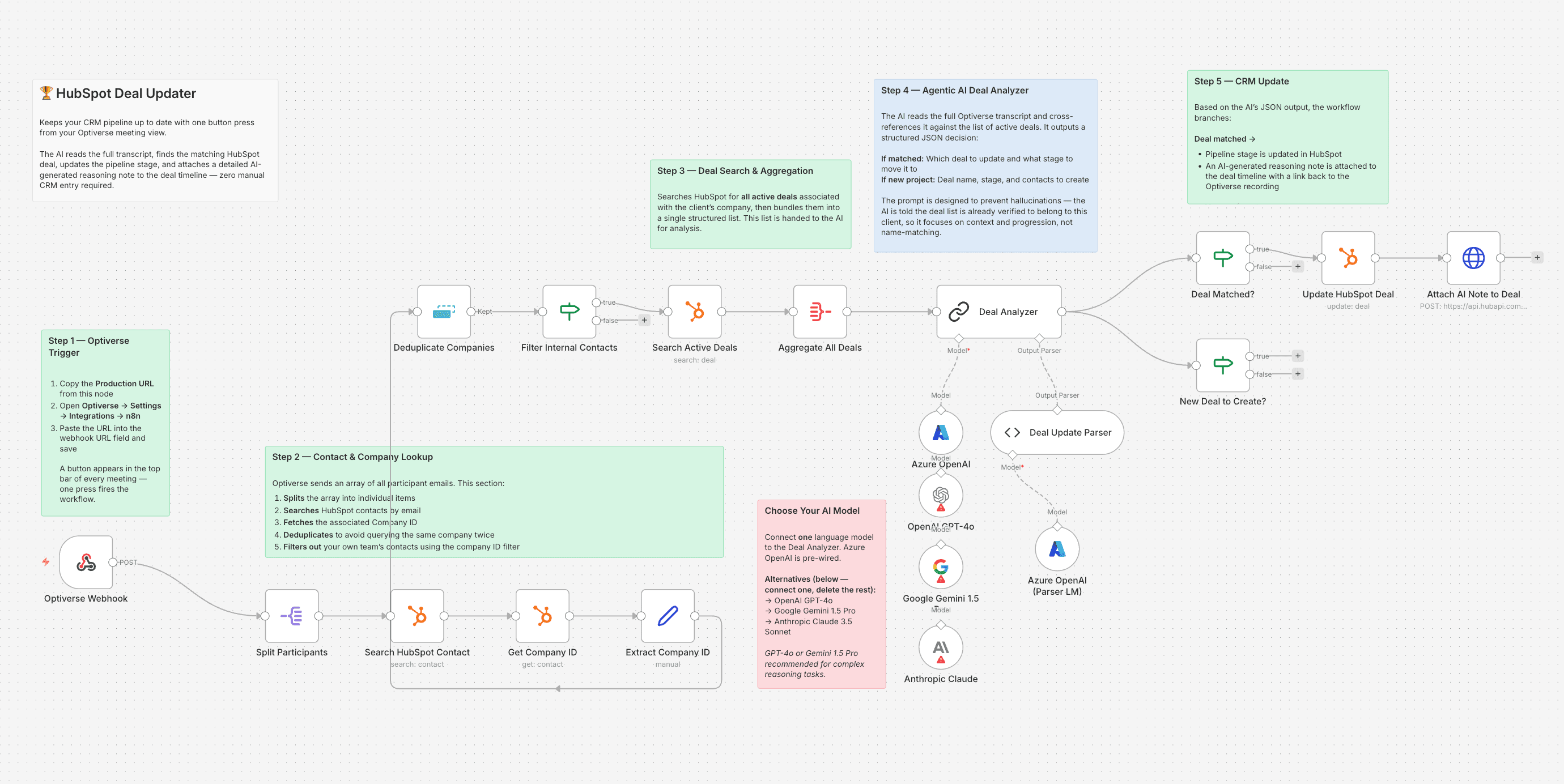
We built a highly sophisticated n8n workflow that uses Optiverse webhook data to search, analyze, and update HubSpot records autonomously. Here is how this intelligent CRM automation AI functions:
Step 1: Extracting Contacts and Finding the Deal
When an Optiverse meeting concludes, the webhook sends the transcript and participant data to n8n. The workflow isolates the email addresses of the clients on the call and queries the HubSpot API.
It finds the matching HubSpot contacts, identifies their ID, and searches for all active deals linked to that company.
Step 2: Agentic Reasoning via AI
This is where the magic happens. The workflow feeds the list of active HubSpot deals and the full Optiverse meeting transcript into an Azure OpenAI model acting as an "Expert Sales Operations AI."
The AI is given strict instructions:
Match the Deal: Read the transcript and figure out which of the active deals was discussed.
Assess Stage Progression: Analyze the conversation to determine if the deal moved forward (e.g., did they agree to a pilot? Did they discuss pricing?).
Identify Net-New Opportunities: If the transcript reveals a completely new project not listed in the active deals, extract the info to create a new one.
Step 3: Updating the CRM automatically
Once the AI returns its structured JSON decision, the workflow uses HubSpot API nodes to execute the updates. If the deal progressed, it automatically changes the deal stage in HubSpot.
Finally, it creates a detailed Note containing the AI's reasoning (e.g., "Moved to 'Pilot' because Daniel agreed to a CHF 15,000 pilot starting in April") and a direct link to the Optiverse meeting recording, attaching it directly to the HubSpot deal.
Native Optiverse HubSpot Integration: The Simple Alternative
Agentic reasoning in n8n is incredibly powerful, but it requires technical setup and maintenance. If your team wants immediate, out-of-the-box functionality, the native Optiverse HubSpot integration is the perfect solution.
Available directly on the HubSpot App Marketplace, Optiverse's native app allows you to automatically create new contacts from meeting participants and push customizable meeting summaries directly to your Contact and Deal activity feeds. It is incredibly simple to set up and saves hours of manual logging without needing a single line of code.
Next Step: Want to implement this agentic HubSpot deal updater for your own team? Download our free step-by-step Guide and the complete n8n workflow JSON file below to start automating your CRM today.
Free n8n Guide
Enter your email and we'll send it directly to your inbox.
Transform Your Sales Ops Today
Whether you utilize a complex n8n build for intelligent stage progression or rely on Optiverse's seamless native integration for instant data syncing, connecting your AI meeting assistant to your CRM is a game-changer. Your team can finally stop doing data entry and focus entirely on closing deals.
Written By:

Mario Assaf
Co-founder
Start Your 14-Day Free Trial Today!
Sign up now to explore Optiverse's powerful features and see how it can streamline your meetings workflow with AI.