How to Automate Follow-Up Emails Using an AI Meeting Assistant and n8n
Learn how to automate follow-up emails using Optiverse's AI meeting assistant and n8n. Discover how to turn meeting transcripts into personalized Gmail drafts instantly.
Following up after a meeting is one of the most critical steps in the sales and customer success process. Yet, it is also one of the most time-consuming. Crafting a personalized, accurate, and engaging email that recaps action items and next steps can take hours out of your week.
What if you could automate follow-up emails entirely? By combining a powerful AI meeting assistant with an automation platform like n8n, you can turn your meeting transcripts into perfectly crafted, ready-to-send email drafts. In this guide, we will walk you through how to use Optiverse, a leading AI meeting assistant, to automate your email drafts seamlessly.
The Challenge of Manual Follow-Up Emails
If you are a Sales Representative, Customer Success Manager, or Project Lead, you likely spend a significant portion of your day reviewing meeting notes and writing follow-ups. A generic template won't cut it—clients expect you to address their specific pain points, mention them by name, and accurately recall the nuances of your conversation.
Relying on manual notes often leads to:
Delayed responses: Taking too long to send the follow-up kills momentum.
Missed details: Human error means critical action items can slip through the cracks.
Wasted time: Time spent writing emails is time away from selling or supporting clients.
An AI meeting assistant solves the initial problem by capturing flawless AI meeting transcripts and summaries. But to truly close the loop, you need a workflow that bridges the gap between your meeting insights and your inbox.
Introducing Optiverse: The Ultimate AI Meeting Assistant
Before diving into complex workflows, it is important to choose the right foundation. Optiverse is an enterprise-grade AI meeting assistant that provides perfect transcription, custom summarization, and task automation.
Unlike basic transcription tools, Optiverse understands over 45 languages and dialects (including Swiss German) and offers deep integration capabilities. While you can use Optiverse’s native integrations to easily push summaries to your CRM or task boards with a single click, power users can leverage its API and webhooks to build highly customized, agentic workflows in n8n.
Building the n8n Workflow: Automate Email Drafts
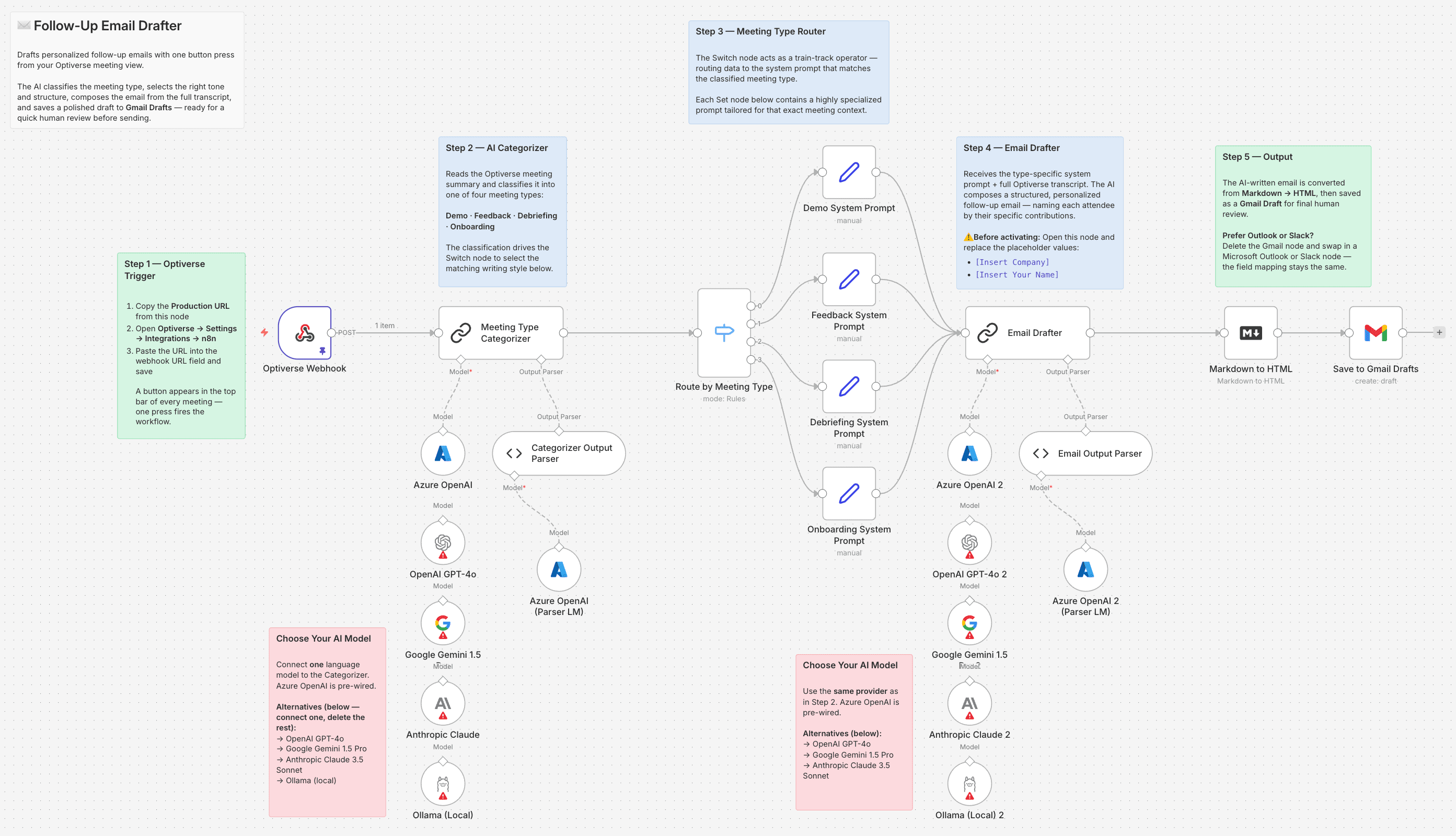
If you want to create a tailored follow-up mail via a single button press directly inside the Optiverse interface, n8n is the perfect middleware. Here is a breakdown of how our custom n8n workflow operates to place a highly accurate draft directly into your Gmail inbox.
Step 1: Triggering the Webhook via Optiverse
The workflow begins when a meeting ends. Optiverse sends a rich webhook payload to n8n. This payload contains the meeting metadata, participant details, the full AI meeting transcript, and the AI-generated summary. You can even add custom context directly inside an Optiverse field that appears after clicking the action button.
Step 2: AI Categorization of the Meeting
Not all meetings require the same follow-up. Using an Azure OpenAI integration within n8n, the workflow acts as an expert data classifier. It analyzes the meeting summary and categorizes the call into one of four distinct meeting summary templates:
Demo: Focuses on showcasing the product.
Feedback: Focuses on user testing and feature requests.
Debriefing: Focuses on internal reviews or post-mortems.
Onboarding: Focuses on next steps for new clients.
Step 3: Crafting the Personalized Message
Once the meeting type is identified, the workflow routes the data to a specific prompt template. For example, if the AI detects a "Demo," it instructs the language model to act as an expert Sales Rep.
The AI scans the full transcript and pulls out exact quotes and pain points, attributing them to specific stakeholders by name. It ensures the tone is professional, conversational, and highly personalized—strictly avoiding hardcoded fluff.
Step 4: Creating the Gmail Draft
Finally, the workflow converts the AI-generated Markdown text into HTML and connects to the Gmail API. It creates a draft directly in your inbox (e.g., your Google Workspace account).
You never have to lift a finger to write the email. You simply open your Drafts folder, review the highly accurate, context-aware message, and hit send.
Optiverse Integrations: Keeping it Simple
While building an n8n workflow offers limitless customization, it can be complicated to set up. If you are looking for immediate results without the technical heavy lifting, Optiverse offers powerful native integrations.
You can seamlessly connect Optiverse directly to platforms like HubSpot, Salesforce, and Notion. With built-in Optiverse integrations, pushing a meeting summary or action items to your CRM is as simple as clicking a button right on the recording page.
Next Step: Want to implement this agentic HubSpot deal updater for your own team? Download our free step-by-step Guide and the complete n8n workflow JSON file below to start automating your CRM today.
Free n8n Guide
Enter your email and we'll send it directly to your inbox.
Reclaim Your Time with Sales Follow-up AI
By leveraging an AI meeting assistant like Optiverse alongside automation tools, you eliminate the busywork of post-meeting administration. Whether you opt for a complex n8n agentic workflow or Optiverse's simple native integrations, automating your follow-ups ensures you always communicate professionally, accurately, and promptly.
Written By:

Mario Assaf
Co-founder
Start Your 14-Day Free Trial Today!
Sign up now to explore Optiverse's powerful features and see how it can streamline your meetings workflow with AI.